Projector Screen Gain Explained: The Ultimate Buying Guide
Understanding high gain vs low gain, ALR screens, and how to choose the perfect setup for a bright living room or a dedicated home cinema.
Interactive Screen Gain Simulator
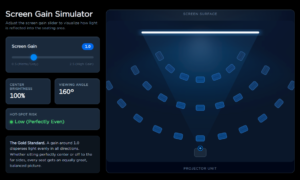
Use the slider below to see the “garden hose” effect in action. Notice how higher gain boosts center brightness but narrows the viewing angle.
Screen Gain Simulator
Adjust the screen gain slider to visualize how light is reflected into the seating area.
The Three Types of Screen Gain
When shopping for a screen, you will generally see three categories:
- 1.0 Gain (The Standard): This is the baseline. A 1.0 screen takes the projector's light and scatters it perfectly evenly in all directions. It acts just like the normal hose.
- High Gain (Above 1.0): This is like putting your thumb over the hose. The screen focuses the light directly straight ahead to make the picture much brighter. Examples include 1.2, 1.5, or even 2.0 gain.
- Low Gain (Below 1.0): This screen is slightly darker (often grey) and actually absorbs a little bit of the light. This helps make the dark colors look inkier and more realistic.
Depending on your room, adjusting this gain value affects three major things: brightness, viewing angles, and image quality.
How Gain Affects Image Brightness
Getting that "punchy" picture is the main goal of any home cinema. This is where gain becomes your best friend.
If you are putting your projector in a living room with windows, ambient sunlight will try to wash out your picture. A High Gain screen (like 1.3 or 1.5) acts like a magnifying glass. It takes whatever light your projector has and boosts it. This gives you a bright, vibrant image even during the day.
On the flip side, if you have a pitch-black, dedicated home theater, a high-gain screen might actually be too bright and hurt your eyes. In a completely dark room, a Neutral (1.0) or Low Gain (0.8) screen is usually best. It makes the black colors look much deeper and more cinematic.
Viewing Angles: Where is Your Sofa?
Here is the catch with High Gain screens: because they focus all the light straight ahead, they create a "sweet spot."
If you are sitting dead-center on the couch, the movie looks incredibly bright and amazing. But what about your friends sitting in chairs off to the far left or right sides of the room? They are sitting outside of that focused beam of light. To them, the screen will look dim and muddy.
If you have a wide seating layout where people are spread out all over the room, you want a 1.0 Gain screen. It scatters light everywhere, meaning every single seat gets the exact same great view.
The Dreaded "Hot-Spotting" Problem
If you push screen gain too high, or if you place your projector too close to the screen, you risk something called Hot-Spotting.
A hot spot is exactly what it sounds like. It is a glaring, blindingly bright ball of light right in the middle of your screen, while the outer corners look dark and shadowed. It literally looks like someone is shining a flashlight through the back of your TV.
It completely ruins the movie experience. Sticking to a proper gain level for your specific projector distance is the only way to avoid this.
High Gain vs. Low Gain: Pros and Cons
High Gain Screens (Above 1.0)
- Excellent for fighting ambient light.
- Makes 3D movies look better.
- Good for low-lumen projectors.
- Narrows the viewing angle.
- High risk of hot-spotting.
Low Gain Screens (Below 1.0)
- Incredible black levels and contrast.
- Perfect for dedicated dark rooms.
- No hot-spotting.
- Very wide viewing angles.
- Requires a very bright, powerful projector to look good.
The Indian Context: Dealing with Bright Living Rooms
In India, we love large, open living spaces with plenty of natural sunlight. While this is great for the home, it is a nightmare for projectors.
Standard white walls or cheap 1.0 gain screens will look completely washed out during a sunny afternoon in a typical Indian apartment. If you are installing a projector in a multi-purpose living room, you must look into an ALR (Ambient Light Rejecting) screen. These specialized screens use specific gain angles to reject ceiling lights and window glare, pushing only the projector's light back to your eyes.
Taking the Guesswork Out with ORwins
Matching the exact right screen gain to your room's lighting, window placement, and seating layout can feel like solving a complicated math puzzle. You do not have to figure it out alone through frustrating trial and error. This is exactly where ORwins comes in.
ORwins relies on advanced engineered solutions to completely take the headache out of home theater setups. Instead of guessing which numbers work best, their experts analyze your specific environment. They carefully calculate your room's ambient light levels, throw distance, and exact seating angles. Using this precise data, ORwins provides the perfect custom-engineered AV and screen solutions tailored to your space. This guarantees a flawless, bright, and deeply immersive picture without any distracting hot-spotting or washed-out daytime colors.
Expert Opinion
As an AV consultant, the biggest mistake I see homeowners make is buying a high-gain screen just because it sounds like an "upgrade." Gain is not about getting the highest number; it is about matching the screen to your room. If you have full light control (no windows, dark walls), buy a 1.0 or 0.8 gain screen. Invest your money in a brighter projector instead of a higher-gain screen. The picture will look much more natural, and your guests will have a perfect view from every seat in the house.
Common Mistakes
- Buying a high-gain screen for a dedicated, dark home cinema.
- Forgetting about seating arrangements and buying a high-gain screen for a wide, L-shaped sofa.
- Pairing an ultra-short-throw (UST) projector with a standard high-gain screen (this guarantees terrible hot-spotting).
- Ignoring wall color. Light bouncing off white walls will ruin your contrast, regardless of your screen gain.
Quick Buying Tips
- Dark, windowless theater room: Go for a 1.0 to 1.1 Gain. It is the gold standard.
- Bright living room with windows: Look for an ALR (Ambient Light Rejecting) screen to fight daylight.
- Super-bright projector but want deep blacks: Choose a Low Gain (0.8) grey screen to boost your contrast.
- Wide seating area: Stick to 1.0 Gain so everyone gets a clear picture.
Conclusion
Understanding projector screen gain does not have to be difficult. Just remember the garden hose. High gain focuses the light for brightness, while low or neutral gain spreads it out for better angles and contrast.
Do not let bad lighting ruin a great projector. Focus on getting the right gain for your specific room, and your movie nights will never be the same! If you are unsure, consult a professional integrator to map out your room properly.